



Boost Flow™ Only in Eclipse
Provide cleaner realtime, and deliver your most polished rough drafts yet.
Click HERE to purchase a Boost Box or here for a compatible laptop.
Terms and Conditions for Boost Minutes:
User must have active Anytime Support to utilize Speech Engine Minutes.
User must have Eclipse 10 or newer.
User must be keyless.
Boost Minutes are purchased by calling (772) 288-3266 during normal business hours, 8AM - 6PM Monday - Friday.
Boost Minutes are rounded to the nearest minute increment. For example, usage of 10 minutes and 29 seconds counts as 10 Boost Minutes; usage of 10 minutes and 30 seconds counts as 11 Boost Minutes.
Purchased Boost Minutes do not expire as long as there has been at least one minute of Boost Minute Activity (BMA) within the previous 12 months. If there has been less than one minute of BMA during that time, any unused Boost Minutes will expire.
After 11 months of no BMA, a reminder email will be sent to the email address on file.
BMA is measured by calendar month.
Boost Minutes are non-transferable between licenses and between customer accounts.
BMA is collected and stored instantly by the Connection Magic server each time Boost is used, and Account Services records are updated weekly.
User acknowledges that Boost requires an active internet connection during use.
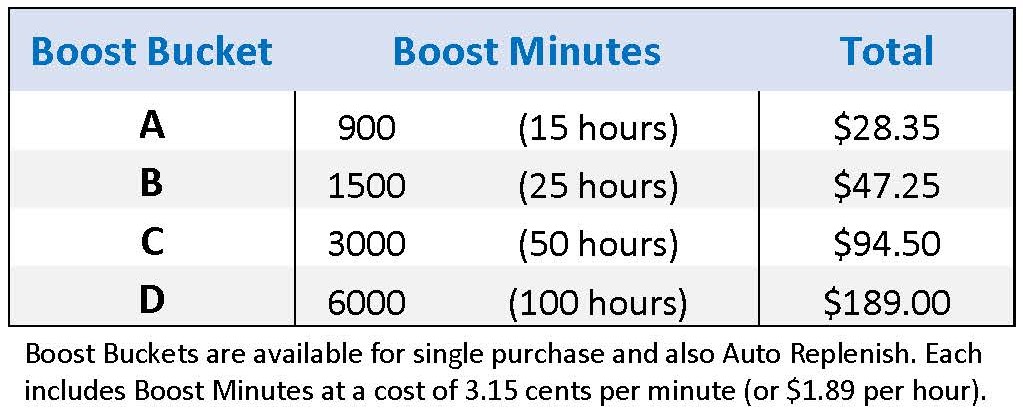
Boost Bucket™ Pricing
Boost Minutes™ power Speechmatics and Google Speech-to-Text in Eclipse.
Use Boost Minutes for Boost, Boost Flow, and Boost Edit features.
In EclipseVox, Speechmatics can also be used as an alternative to Dragon.
Eclipse 12: Speechmatics (cloud or local)
Eclipse 10 & 11: Speechmatics (local only), Google Speech-to-Text (cloud only)
To use Speechmatics locally, you need a Boost Box™ or supported computer purchased from Advantage Software.
Boost Auto Replenish
With optional and easy Auto Replenish, you don't have to spend effort monitoring your Boost account.
You set up the rules one time, and we'll automatically check and reload your account weekly as necessary.
1. Select a Low Balance limit.
2. Select Boost Bucket A, B, C, or D.
3. Set up in 5 minutes with Account Services at (772)288-3266.
Set up, change, or cancel at any time by calling Account Services during regular office hours, Monday - Friday, 8AM - 6PM ET.